Terminal UI
lox tui is a full-screen, keyboard-first live view of your installation — btop for your house.
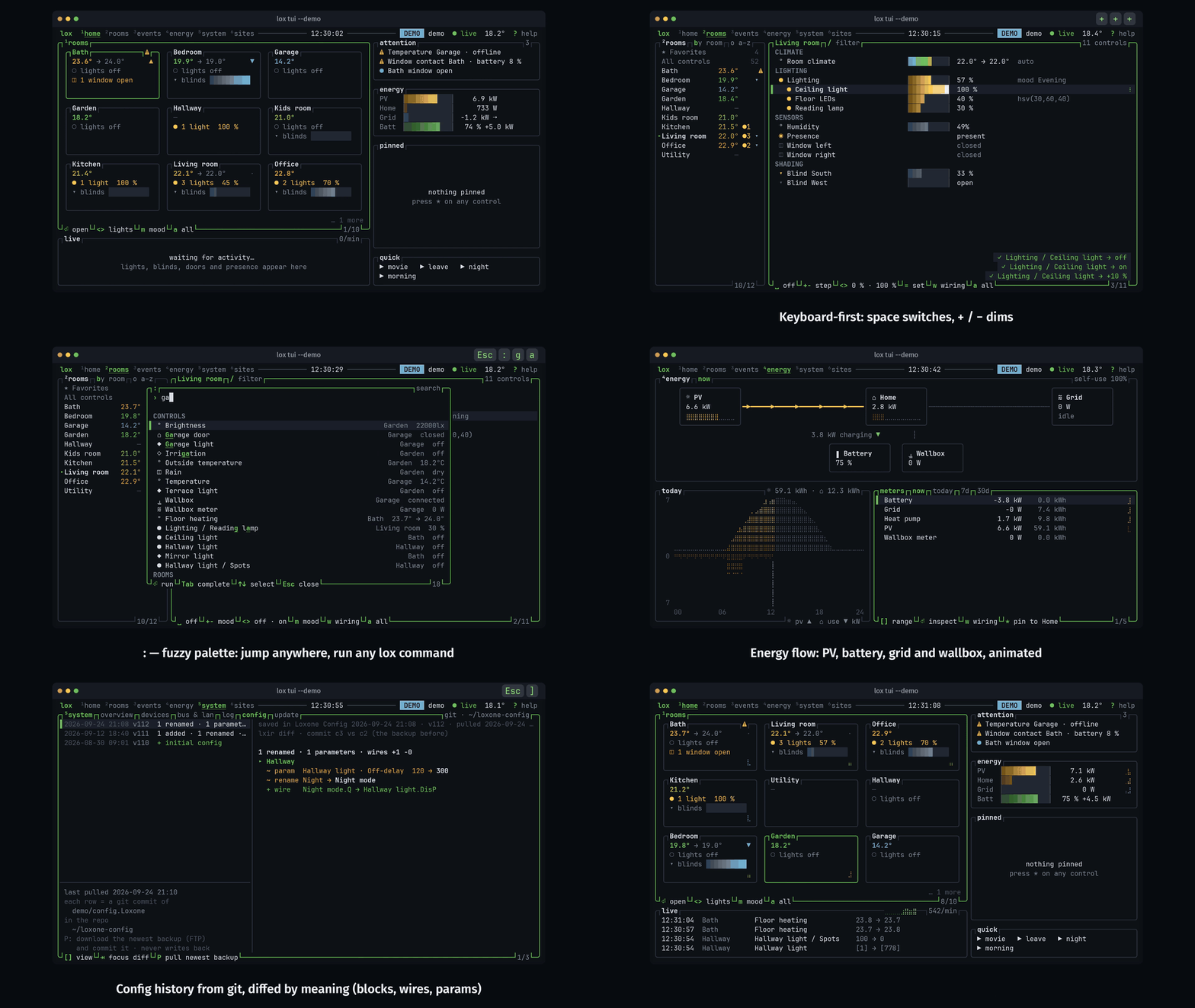
Table of contents
Start
lox tui                        # the current context, on the screen you left last
lox tui --demo                 # a simulated house, no Miniserver needed: try this first
lox tui --screen energy        # start on: home | rooms | events | energy | system | sites
lox tui -r Küche               # Rooms, with a room selected
lox tui --read-only            # wall display or screen sharing: nothing is ever sent
lox --ctx office tui           # another Miniserver (switch live with C or on Sites)
| Flag | Effect |
|---|---|
--theme | night (default), day, mono, neon; --no-color / NO_COLOR picks mono |
--icons nerd | Nerd Font icons (plain Unicode by default) |
--no-mouse | Keep the terminal’s own text selection |
--no-motion | No animations (also LOX_NO_MOTION=1) |
Screens
| Key | Screen | What’s there |
|---|---|---|
1 | Home | Room cards, what needs attention (open windows, low batteries, offline devices), pinned controls, a live feed |
2 | Rooms | Every control with its live value, grouped by room, category or type |
3 | Events | Every state change as it happens, filterable, with “what happened just before” |
4 | Energy | Animated PV / home / grid / battery flow, meters, today’s curve |
5 | System | CPU, heap, devices, CAN bus and LAN, the Miniserver log, config history with logic diffs, firmware |
6 | Sites | All your Miniservers (contexts) at a glance |
On any control: w opens its wiring (the config logic around it, with live values on the wires: why is this light on?), c its history chart (6 h to a year, with period compare).
Keys worth knowing
| Key | Action |
|---|---|
? | The keys for where you are (every pane’s border also shows the ones in reach) |
: or Ctrl-K | Palette: fuzzy go-to for rooms, controls, scenes, and any lox command |
␣ | Primary action (toggle, open/close) |
+ - = | Step up, step down, set an exact value |
m / a | Pick a mood or mode / all actions |
y | Copy the equivalent lox command, for scripts |
* | Pin to Home |
Esc | Back one step: never quits |
q | Close the popup; on a screen, quit |
All keys: COMMANDS.md › Terminal UI.
Config history
System › Config lists your config repo’s snapshots with their logic diffs. ⏎ browses a snapshot (pages, blocks, Lox Logic source, / search), m marks a commit to compare any two, w opens a changed block’s wiring at that snapshot, P pulls a new backup.
Safety
Lights, blinds and moods act instantly. Doors, gates, the alarm, the wallbox, door openers wired as push-buttons and anything on your confirm: list ask y/N first; reboot and firmware update ask you to type the context name.
# ~/.lox/config.yaml (or the context entry)
confirm:
  - Pool Abdeckung [Pool]
Preferences
~/.lox/tui.yaml:
theme: night          # night | day | mono | neon
icons: plain          # plain | nerd
motion: true
mouse: true
transparent: false    # keep the terminal background
roles:                # energy role overrides: meter name or UUID → grid | pv | battery | load
  Balcony PV: pv
Pins, mutes, palette history and the last screen are kept per context in tui-state.yaml.